Offerwall integration for your own rewards site.
Offerwall integration on RewardsLabel runs through one postback address for your site. You add a partner in the console, paste its wall link and set its bonus. When a member completes an offer, the partner sends a postback and your site credits the member, or deducts the amount on a chargeback.
- Partners
- Walls confirmed with RewardsLabel support
- Built-in APIs
- CPX Research, Monlix
- Chargebacks
- Amount deducted from the balance
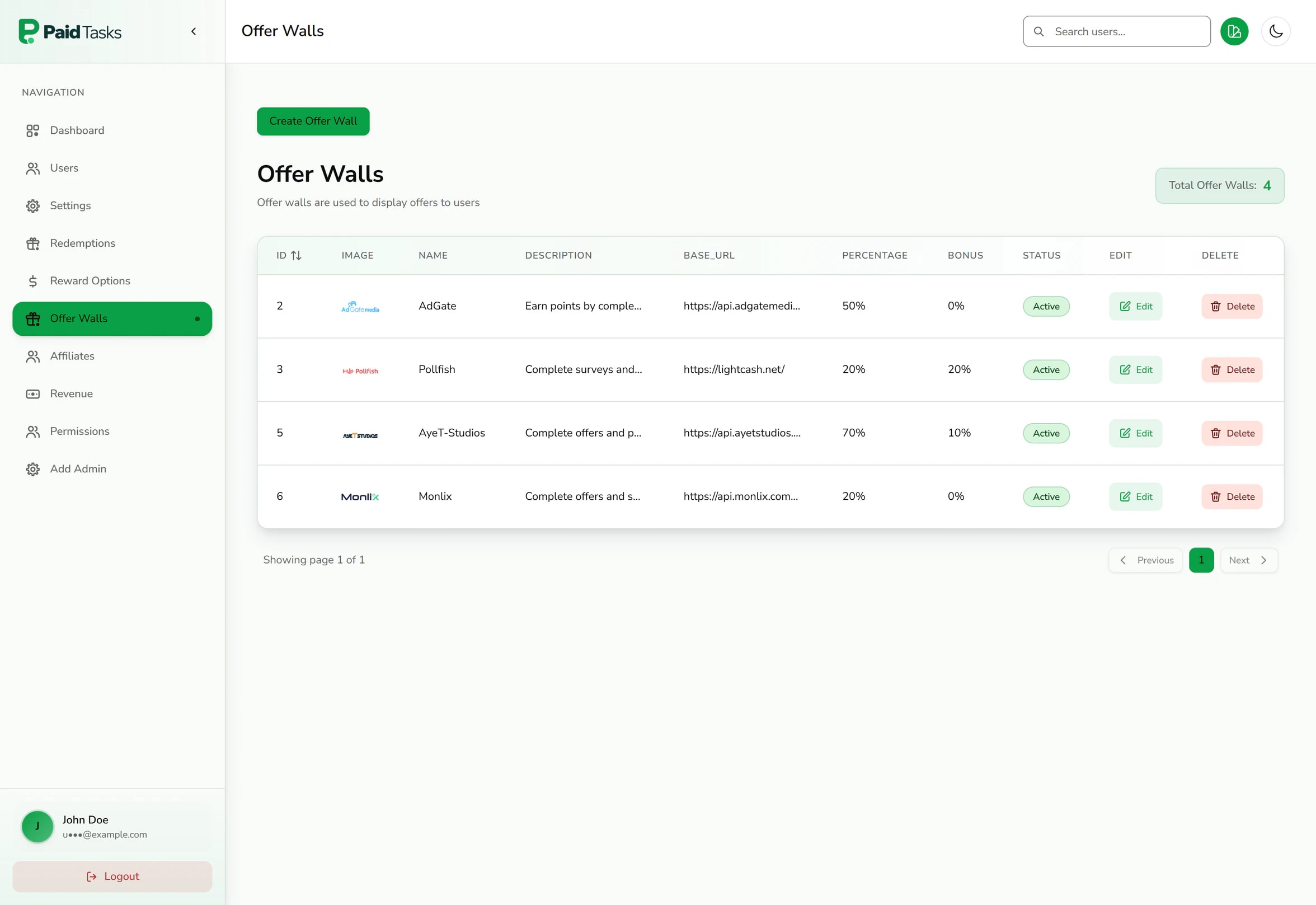
Adding an offerwall takes one form.
Every partner lives in the offer walls table of your console. The same form covers a large offerwall network and a small survey wall.
Name, logo and description
What members see on the partner card on the earn page, and at the top of the wall when they open it.
Wall link
The link from your partner dashboard. Put the placeholder {user_id} where the partner expects your member’s ID, and the site fills it in for each member when the wall opens on the earn page.
Member share
The percentage of each payout you intend to pass to members. You apply it through the currency rate in the partner dashboard, because the amount credited is the amount the partner sends. The console keeps it on record for your revenue estimates.
Bonus
An extra percentage the site credits on top of every completion from this partner. Members see it as a bonus badge on the partner card.
Status
Active partners appear on the earn page. Pause one and it leaves the site without losing its settings.
The postback is the source of truth.
Members are credited when a partner confirms a conversion server to server, not when a member clicks an offer. Setting up the offerwall postback URL is the core of every integration.
One address for your site
Every partner sends to the same postback address on your domain. Use the ID shown in your offer walls table as each partner’s offerwall_id, so completions are recorded against the right wall.
Every completion is recorded
The site stores the transaction ID, offer name, partner and IP address with each completion, so you can answer a member who asks about a missing credit.
Referral commission at the same moment
If the member was referred, the referrer’s commission is credited from the same postback. See referral commissions.
Confirm each partner before you go live
Partners differ in how they send postbacks and mark reversals. Before you switch a partner on, confirm its postback method, parameter format and reversal format with RewardsLabel support.
Chargebacks deduct the amount from the balance.
Partners sometimes reverse a conversion after crediting it, usually because the advertiser rejected it. Your site handles the reversal through the same postback address.
When a partner’s postback marks a conversion as a chargeback, in the format your site reads, the site deducts the amount from the member’s balance, even below zero. Partners mark reversals in different ways, so confirm each partner’s reversal format with RewardsLabel support when you connect it.
Review members whose completions keep getting charged back. Changing a member’s account status stops them signing in, opening walls and redeeming while you look.
Rewards you have already paid cannot be pulled back by software, which is why every withdrawal waits in your redemption queue until you approve it. Checking a new member’s completions before their first payout is the cheapest fraud control you have.
Two partners also have built-in API connections.
For CPX Research and Monlix the site can also fetch surveys or offers for each member through the partner’s API, using keys you enter in your console settings.
- CPX Research
- Enter your app ID and security hash. The site loads up to 12 surveys for each member, with payout, length and rating, and shows them as survey cards on the earn page.
- Monlix
- Enter your app ID and switch on provider offers in settings. The site fetches Monlix campaigns for each member using their member ID.
- Every other partner
- Connects through its wall link and your postback address, once its postback format is confirmed with RewardsLabel support.
What you set up on the partner side.
Partners pay you, not RewardsLabel, so each relationship starts with your own publisher account.
- 01
Apply as a publisher
Create a publisher account and add your site. Many partners review a site before approving it, so apply once your domain is live.
- 02
Set the currency
Set the partner’s currency so it sends the member’s share in dollars of reward value, for example 0.70 on a $1.00 offer.
- 03
Enter the postback address
Enter your site’s postback address in the partner dashboard and map its macros to user_id, amount, transaction_id, offer_name and ip_address, with offerwall_id fixed to the ID in your offer walls table. Confirm the method and reversal format with RewardsLabel support first.
- 04
Add the wall in your console
Paste the wall link with the {user_id} placeholder, set the share and bonus, and switch the partner on.
Not sure which partners to start with? The guide to the best offerwalls for GPT sites compares the common choices for a new site.
Questions about offerwall integration.
How postbacks, shares and chargebacks work on a site you run.
- What is an offerwall postback?
- A postback is a server-to-server request a partner sends to your site when a member completes an offer. It names the member, the amount and the transaction. Your site credits the member when the postback arrives, so earnings never depend on what happens in the member’s browser.
- How do I set up an offerwall postback URL?
- Enter your site’s postback address in the partner’s publisher dashboard, then map the partner’s macros to user_id, amount, transaction_id, offer_name and ip_address, with offerwall_id fixed to that partner’s ID from your offer walls table. Confirm the method and reversal format with RewardsLabel support. A test conversion credits a real balance, so send it to a test member.
- Can I add any offerwall?
- Partners that open through a web link and send server-to-server postbacks can be added in the console, once their postback format is confirmed with RewardsLabel support. CPX Research and Monlix also have built-in API connections. You need your own approved publisher account with each partner, and most partners review your site first.
- What happens when an offer is charged back?
- When the partner’s postback marks the conversion as a chargeback in the format your site reads, your site deducts the amount from the member’s balance. Confirm each partner’s reversal format when you connect it, and keep an eye on accounts with repeated chargebacks before you approve their next redemption.
- Does RewardsLabel take a share of offerwall revenue?
- No. Partners pay your publisher accounts directly, and RewardsLabel charges a fixed licence with no revenue share. Your margin is the difference between what partners pay you and what your members redeem. Partners pay you on the payment terms you agree when you open each publisher account. See pricing for the current plan.
- How many offerwalls should a new site connect?
- Start with a few partners that cover your members’ countries and devices, then add more as you see which ones convert. Each extra wall is one more form in the console and one more postback setup, so testing a partner costs little time.
Keep reading
- Offerwall sitesOfferwall website software that runs many partners side by side, each with its own share, bonus and status.
- Payouts and redemptionsList the rewards members can redeem and approve, reject or refund every request from one queue.
- Referral commissionsReferral codes and links on your domain, with commission on referred members’ offer earnings set per member.
- Best offerwalls for GPT sitesAn operator’s comparison of offerwall and survey networks: payment terms, minimums, postback security, reversals and recent ownership changes.
- How GPT sites make moneyThe operator’s side of the get-paid-to business model: offer margin, member share, payout fees, reversals, cash flow and a sample monthly P&L.
- Get-paid-to (GPT) sitesHosted get-paid-to site software with offerwalls, surveys, payouts and referrals on your own domain.
Connect your offerwall partners to a site you own.
Set up the site and domain first. Partners, shares and bonuses are added from the console once your publisher accounts are approved.