The paid survey site script you don’t have to install.
A common way to start a survey rewards website is to buy a paid survey site script and rent a server to run it on. RewardsLabel replaces both. You get a hosted survey site on your own domain, with a survey list loaded for each member, the survey partners you choose and a payout queue you approve. Members answer surveys, earn points and cash out. You keep the margin.
- Built-in survey integration
- CPX Research
- You provide
- Partner accounts, domain, logos
- Licence
- $149 a month, no revenue share
A survey list that fills itself.
Members on a survey site come back for one reason: there is always another survey to take. The survey list on your site is requested live from your survey partner for each member who opens it.
Loaded for each member
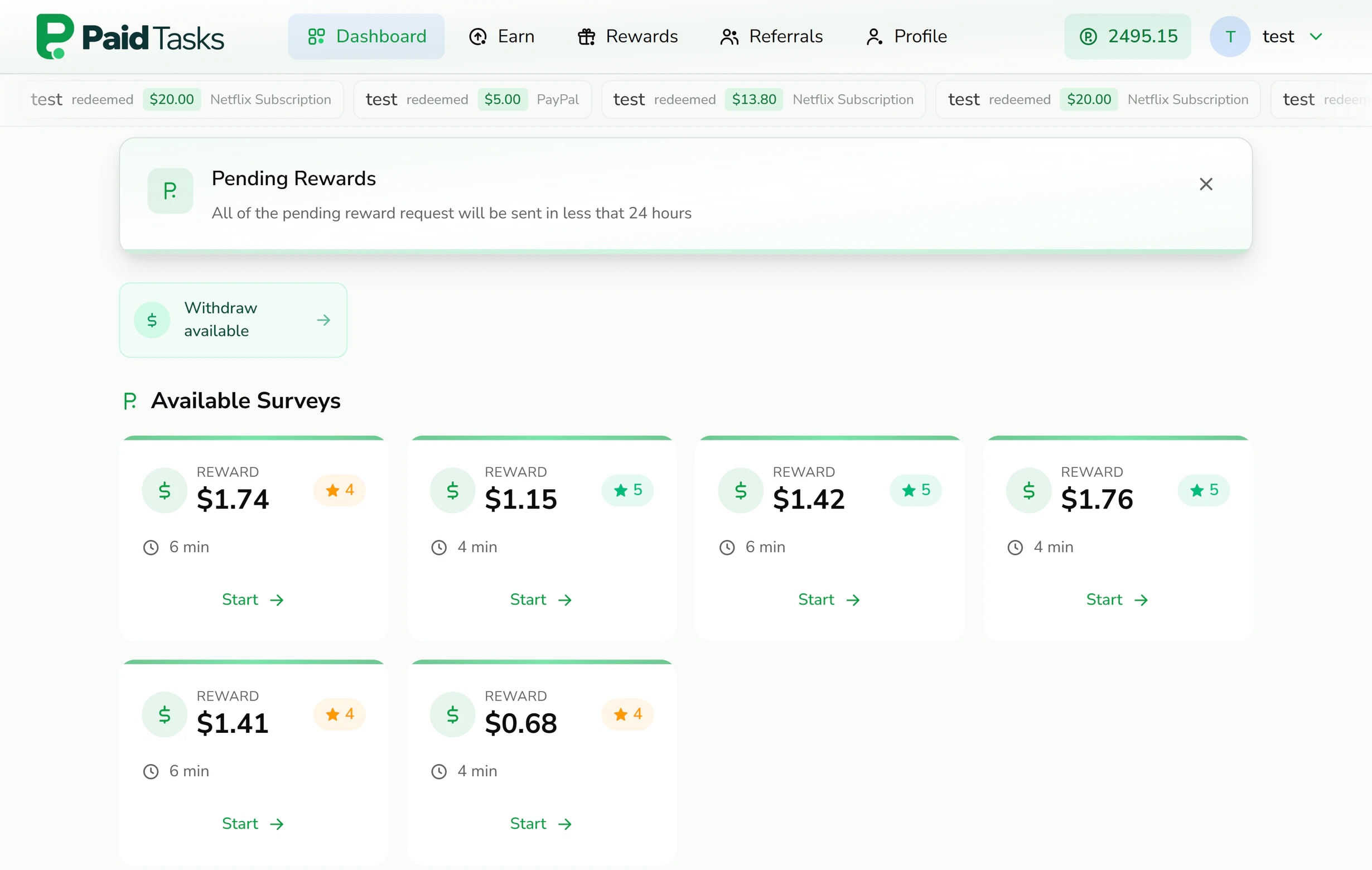
When a member opens their dashboard or the earn page, the site asks CPX Research for the surveys it has for that member and shows up to 12 at a time.
Reward, length and rating up front
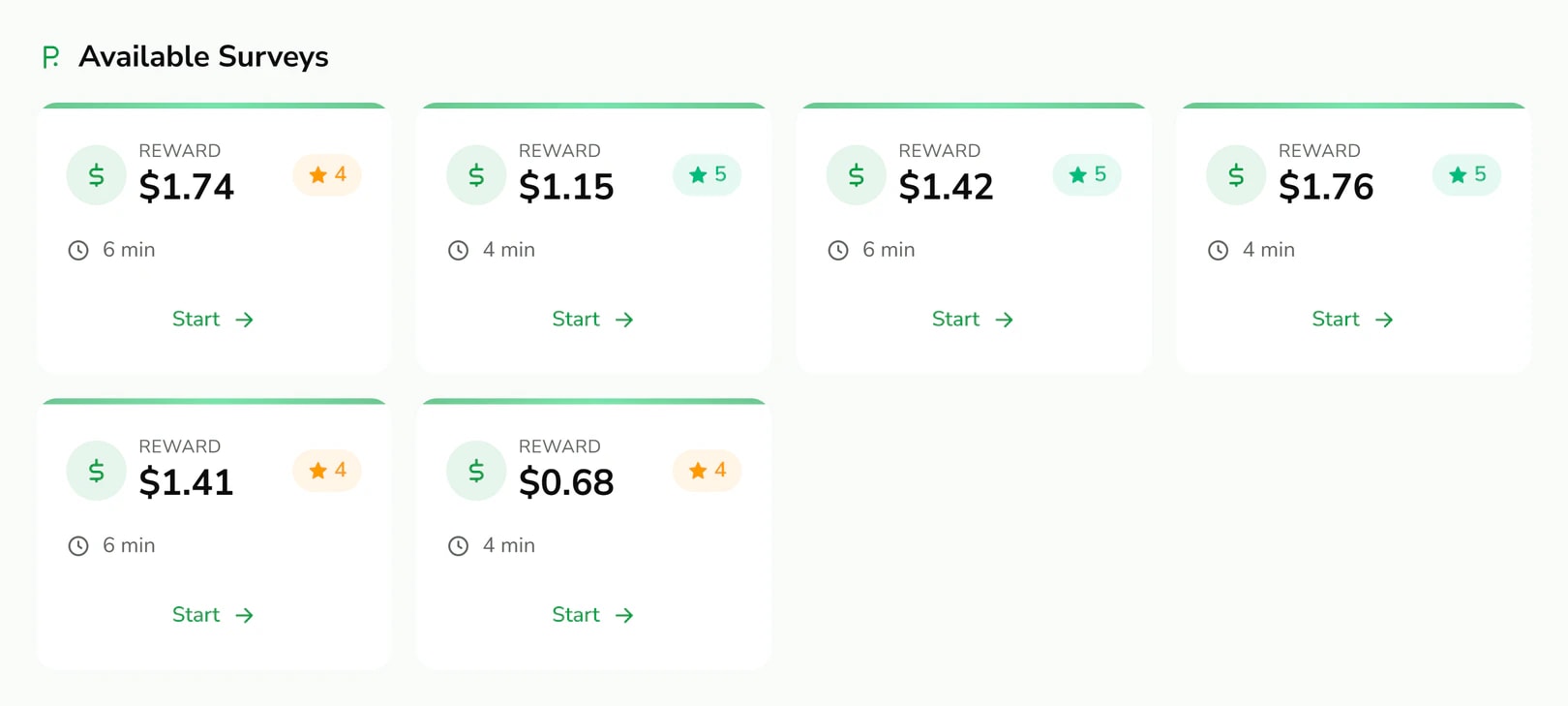
Each card shows what the survey pays, how many minutes it should take and how other respondents rated it, so members choose surveys they will finish.
Credits arrive by postback
When a member completes a survey, the partner tells your site and the member’s balance goes up by the amount it sends, at the currency rate you set in your partner account.
A short profile after sign-up
After verifying their email, members are asked for their gender, age range and device type. Device is detected for them, and the whole step can be skipped.
To switch the survey list on, you enter your CPX Research app ID and security hash in the console settings. CPX Research approves publishers itself, so open that account before you plan your launch date.
Add more survey partners as you grow.
One survey partner rarely has enough surveys for every member in every country. Survey sites usually add a second and a third source once members start asking for more.
Other survey walls connect the same way as offerwalls. You add the partner in the console with its link, logo and description, then set the partner’s postback to your site. The wall appears on the earn page under Offer Providers, next to the survey list. On the demo site, Pollfish is connected this way with a 20% bonus. Pollfish’s publisher page now redirects to BitLabs. Before you apply to any new survey partner, confirm with RewardsLabel support that your site can receive its callbacks.
- Member share
- The part of each survey payout that reaches the member. You set it through the currency rate in each partner’s own dashboard and record it in the console for your revenue estimates.
- Bonus
- An extra percentage on top of the share. Use it to steer members toward the partner whose surveys they finish most often.
- Status
- Turn a partner off and its wall disappears from the earn page at once, with its link, share and bonus kept for when you turn it back on.
The full setup, including the postback parameters, is on the offerwall integration page. For partners worth applying to, read best offerwalls for GPT sites.
Where a survey site makes its margin.
Survey partners pay per completed response. Your margin is the part of that payment you do not pass on to the member.
Completed survey
- What happens
- The partner pays your publisher account for the response
- What it means for you
- Revenue, at the rate the partner sets
Member credit
- What happens
- Points arrive at the currency rate you set with that partner, plus any bonus
- What it means for you
- Your largest cost
Referral commission
- What happens
- The referrer earns a percentage of what the referred member earns
- What it means for you
- A cost that brings in new members
Chargeback
- What happens
- The partner reverses a response after its quality checks
- What it means for you
- You lose the revenue and the points come off the member’s balance
Redemption
- What happens
- The member cashes out and you send the reward
- What it means for you
- Payout fees on top of the reward itself
| Event | What happens | What it means for you |
|---|---|---|
| Completed survey | The partner pays your publisher account for the response | Revenue, at the rate the partner sets |
| Member credit | Points arrive at the currency rate you set with that partner, plus any bonus | Your largest cost |
| Referral commission | The referrer earns a percentage of what the referred member earns | A cost that brings in new members |
| Chargeback | The partner reverses a response after its quality checks | You lose the revenue and the points come off the member’s balance |
| Redemption | The member cashes out and you send the reward | Payout fees on top of the reward itself |
In the screenshot on this page, the survey cards offer the member between $0.68 and $1.76 each. That is one member’s list at one moment on the demo site, not a typical rate. A single survey pays little, so a survey site depends on members taking many of them, which is why the size and freshness of the list matter more than any one partner’s rate.
The guide on how GPT sites make money works through the full calculation, including payout fees and reversals.
A survey site script, or a hosted survey site.
A paid survey site script gives you the code. A hosted platform gives you a running site. The right choice depends on where you want to spend your time.
RewardsLabel handles
- Hosting on a database created for your site alone, with platform updates applied for you
- HTTPS on your domain, issued and renewed automatically
- The survey list, the postback endpoint and chargeback handling
- The member site, the rewards store and the redemption queue
With a paid survey site script, you handle
- Renting, configuring and securing a server
- Installing updates when the seller releases them
- Certificates, backups and keeping the site online
- Repairing an integration when a partner changes its API
A paid survey site script is the better fit if you want to change, at code level, how surveys are matched or displayed. RewardsLabel gives no source access: you configure the site in the console. The trade is laid out in GPT site script vs hosted platform.
Launching a survey rewards website.
The setup flow takes care of the site itself. The partner side takes longer, so start it first.
- 01
Apply to CPX Research
Open a publisher account and request approval for your domain. Approval is the partner’s decision, on its own terms.
- 02
Set up your site
Choose the site name and domain, then upload a main logo, a compact logo and a favicon.
- 03
Connect the survey list
Enter your CPX Research app ID and security hash in the console settings, then add any other survey walls.
- 04
List rewards and open the site
Add the rewards members can redeem, such as PayPal cash or gift cards, and start inviting members.
Every step after approval is covered in the guide on how to start a GPT site, which applies to survey sites as well.
Questions about starting a paid survey site.
What the platform does, what partners decide and what you pay.
- What is a paid survey site?
- A paid survey site rewards members for answering market research surveys. Survey partners pay the site for each completed response, the site credits members in points, and members exchange the points for cash or gift cards. The site keeps the difference between what partners pay and what members redeem.
- Do I need a paid survey site script to start?
- No. RewardsLabel is a hosted platform, so there is nothing to install. You set the site name, domain and logos, add your survey partner credentials in the console, and the survey list appears for members. Hosting, updates and HTTPS are included in the licence.
- Which survey partners can I use?
- CPX Research has a built-in connection that loads a survey list for each member. Other survey walls connect through the postback endpoint like any offerwall, once you have confirmed their callback format with RewardsLabel support. You open and hold every partner account yourself, and each partner approves your site on its own terms.
- Do members have to fill in a profile?
- After verifying their email, members are asked for gender, age range and device type. Device is filled in automatically, and members can skip the step entirely. The answers are stored on the member’s profile. Survey partners also screen respondents inside the surveys themselves.
- What happens when a survey response is rejected?
- Survey partners can reverse a completion after their quality checks. When that postback arrives flagged as a chargeback, the survey’s amount comes off the member’s balance, and the deduction shows in their record in the console. Check a member’s recent chargebacks before you approve their next redemption.
- How much does a survey site cost to run on RewardsLabel?
- The licence is $149 a month or $1,490 a year, plus a $25 one-time activation fee, with no revenue share on survey earnings. Your other costs are the domain, payout fees and the rewards members redeem. See pricing for what the licence includes.
- Can I see a survey site running on the platform?
- Yes. paidtasks.io runs on RewardsLabel with the CPX Research survey list and several partner walls. The demo page has shared logins for its member site and its admin panel. Sign in as a member to see the survey cards, then sign in to the admin panel to see the partner settings behind them.
Keep reading
- Offerwall integrationAdd offerwall partners in the console, set a bonus, record each share, and credit members through one postback address.
- Best offerwalls for GPT sitesAn operator’s comparison of offerwall and survey networks: payment terms, minimums, postback security, reversals and recent ownership changes.
- Payouts and redemptionsList the rewards members can redeem and approve, reject or refund every request from one queue.
- Get-paid-to (GPT) sitesHosted get-paid-to site software with offerwalls, surveys, payouts and referrals on your own domain.
- GPT script vs hosted platformA GPT site script, an existing site, a custom build or a hosted platform: costs, upkeep and control compared.
- How to start a GPT siteThe operator’s order of work for a get-paid-to site: audience, software, legal pages, partners, points, payouts and fraud.
Start a paid survey site on your own domain.
Set up the site with its name, domain and logo files, then add your CPX Research app ID and security hash in the console.